Nonlinear Equation
Root of a nonlinear equation near initial guess \(x_0\) can be found using Fzero or Fsolve. It numerically locates a value: \(x\) such that: \(f(x) = 0\). This is particularly useful when analytical solutions are difficult or impossible to obtain.
To solve the equation: \(x\exp(x) = 2\), start with initial guess of \(x_0 = 0.5\);
//Single nonlinear equation
double f(double x) => x * Exp(x) - 2;

// solve equation using fzero
double x = Fzero(f, 0.5);
Console.WriteLine($"x = {x}");
Ouput
x = 0.8526055020137255
In this case, Fzero first search for an interval that brackets the root. Then uses brent’s method to hone in on the root. If we are sure of the interval containing the root, we can save the effort spent on bracketing the root by supplying that.
//Single nonlinear equation (bracketted)
double f(double x) => x * Exp(x) - 2;
double x = Fzero(f, [0.5, 1]);
Console.WriteLine($"x = {x}");
Ouput
x = 0.8526055020137254
To have window into the solution process, we can using solver setting SolverSet() to get the solver to print out the result after each iteration.
// Single nonlinear equation
double f(double x) => x * Exp(x) - 2;

// set solver behaviour
var opts = SolverSet(Display: true);

// solve equation using fzero
double x = Fzero(f, 0.5, opts);
Console.WriteLine($"x = {x}");
Ouput
 Search for an interval around 0.5 containing a sign change:
fun-count     a          f(a)           b          f(b)     Procedure
    1         5e-1   -1.1756e+0         5e-1   -1.1756e+0   initial interval
    3    4.7172e-1    -1.244e+0    5.2828e-1    -1.104e+0   search
    5       4.6e-1   -1.2713e+0       5.4e-1   -1.0734e+0   search
    7    4.4343e-1   -1.3091e+0    5.5657e-1    -1.029e+0   search
    9       4.2e-1   -1.3608e+0       5.8e-1    -9.641e-1   search
   11    3.8686e-1   -1.4304e+0    6.1314e-1   -8.6802e-1   search
   13       3.4e-1   -1.5223e+0       6.6e-1   -7.2304e-1   search
   15    2.7373e-1   -1.6401e+0    7.2627e-1   -4.9853e-1   search
   17       1.8e-1   -1.7845e+0       8.2e-1   -1.3819e-1   search
   19    4.7452e-2   -1.9502e+0    9.5255e-1     4.693e-1   search

 Solving for solution between 0.047452 and 0.952548
fun-count     x         f(x)       Procedure
   19    9.5255e-1     4.693e-1    initial
   20    7.7699e-1    -3.101e-1    interpolation
   21    8.4684e-1   -2.4938e-2    interpolation
   22    8.5264e-1    1.5721e-4    interpolation
   23    8.5261e-1   -6.9891e-7    interpolation
   24    8.5261e-1  -1.9465e-11    interpolation
   25    8.5261e-1         0e+0    interpolation
x = 0.8526055020137255
by setting the solver setting in the case of bracketed root, we can see how the solution process differs from the case of a single initial guess.
// Single nonlinear equation
double f(double x) => x * Exp(x) - 2;

// set solver behaviour
var opts = SolverSet(Display: true);

// solve equation using fzero
double x = Fzero(f, [0.5, 1], opts);
Console.WriteLine($"x = {x}");
Ouput
fun-count     x         f(x)       Procedure
    2         1e+0    7.1828e-1    initial
    3    8.1037e-1   -1.7768e-1    interpolation
    4    8.4798e-1    -2.004e-2    interpolation
    5    8.5263e-1    9.9913e-5    interpolation
    6    8.5261e-1   -3.5651e-7    interpolation
    7    8.5261e-1  -6.3105e-12    interpolation
    8    8.5261e-1  -2.2204e-16    interpolation
x = 0.8526055020137254
SepalSolver also has gradient based “Fsolve”, which can use finite difference, user defined functions, or automatic differentiation methods to evaluate the gradient. How to do this is demonstrated in the following example.
Using finite difference
// define the function
double fun(double x) => 3 * x - Cos(x * x) - 0.5;

// set initial guess
double x0 = 0.1;

// call the solver
var opts = SolverSet(Display: true);
var x = Fsolve(fun, x0, opts);

// display the result
Console.WriteLine($"x = {x}");
Ouput
Func-count      x               f(x)
     1      1.00000E-1     -1.19995E+0
     3      4.99717E-1      3.01682E-2
     5      4.90426E-1      6.23785E-5
     7      4.90406E-1     2.82767E-10
x = 0.49040645401321326
Using user defined function example
// define the function
double fun(double x) => 3 * x - Cos(x * x) - 0.5;

// set initial guess
double x0 = 0.1;

// call the solver
Func<double, double> userJacobian = x => 3 + 2 * x * Sin(x * x);
var opts = SolverSet(Display: true, UserDefinedJac: userJacobian);
var x = Fsolve(fun, x0, opts);

// display the result
Console.WriteLine($"x = {x}");
Ouput
Func-count      x               f(x)
     1      1.00000E-1     -1.19995E+0
     2      4.99717E-1      3.01682E-2
     3      4.90426E-1      6.23684E-5
     4      4.90406E-1     2.62401E-10
x = 0.49040645400691485
Using automatic differentiation example
// define the function (the variable must be of the type AUTODIFF)
AutoDiff fun(AutoDiff x) => 3 * x - Cos(x * x) - 0.5;

// set initial guess
double x0 = 0.1;

// call the solver
var opts = SolverSet(Display: true);
var x = Fsolve(fun, x0, opts);

// display the result
Console.WriteLine($"x = {x}");
Ouput
Func-count      x               f(x)
     1      1.00000E-1     -1.19995E+0
     2      4.99717E-1      3.01682E-2
     3      4.90426E-1      6.23684E-5
     4      4.90406E-1     2.62401E-10
x = 0.49040645400691485
Practical Application
The gas compressibility factor (Z-factor) measures how much a real gas deviates from ideal gas behavior. It is defined as:
where:
\(P\) = pressure
\(V\) = volume
\(n\) = number of moles
\(R\) = gas constant
\(T\) = temperature
Accurate determination of \(Z\) is essential in petroleum engineering for reservoir simulation, material balance, and pipeline design. Unlike explicit correlations, which provide \(Z\) directly as a function of pseudo-reduced pressure (\(P_{pr}\)) and pseudo-reduced temperature (\(T_{pr}\)), implicit correlations require solving an equation iteratively because \(Z\) appears on both sides of the equation.
The Hall–Yarbrough correlation (1973) is one of the most widely used implicit methods for estimating Z. It was developed based on the hard-sphere equation of state and tested against multiple reservoir gas systems. The general form is:
where:
\(P_{pr} = P/P_c\) (pseudo-reduced pressure)
\(T_{pr} = T/T_c\) (pseudo-reduced temperature)
\(t = 1/T_{pr}\)
\(P_c, T_c\) = pseudo-critical properties of the gas mixture
Because reduced density equation is nonlinear, iterative numerical methods such as Newton–Raphson or successive substitution are required to solve it.
Applications
Reservoir engineering: material balance calculations and reserves estimation.
Pipeline design: predicting pressure drop and flow efficiency.
Simulation software: incorporated into PVT packages for automated Z-factor evaluation.
//Z factor application
static double ZfactorHY(double Pr, double Tr)
{
    double z = 1, t, tm1, tm1e2, A, B,
        C, D, r, y2, y3, y4, Den;
    if (Pr != 0)
    {
        t = 1 / Tr;
        tm1 = 1 - t; tm1e2 = tm1 * tm1;
        A = 0.06125 * t * Exp(-1.2 * Pow(1 - t, 2));
        B = t * (14.76 - t * (9.76 - t * 4.58));
        C = t * (90.7 - t * (242.2 - t * 42.4));
        D = 2.18 + 2.82 * t; r = A * Pr;
        var yfunc = new Func<double, double>(y =>
        {
            y2 = y * y; y3 = y2 * y; y4 = y3 * y;
            Den = Pow(1 - y, 3);
            return -A * Pr + (y + y2 + y3 - y4) / Den -
            B * y2 + C * Pow(y, D);
        });
        r *= Pr < 5 ? 2 : 1;
        r /= Pr > 13 ? 2 : 1;
        double y = Fsolve(yfunc, r);
        z = A * Pr / y;
    }
    return z;
}


// set up ressure and temperature mesh
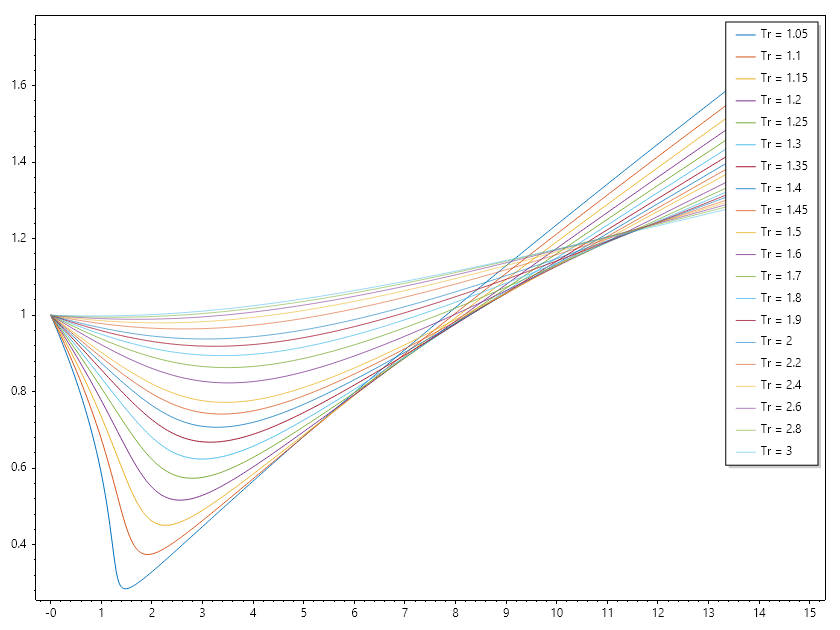
ColVec Pr = Linspace(0, 15, 501);
double[] Tr = [1.05,    1.10,   1.15,   1.20,   1.25,   1.30,   1.35,
               1.40,    1.45,   1.50,   1.60,   1.70,   1.80,   1.90,
               2.00,    2.20,   2.40,   2.60,   2.80,   3.00];

// compute z factors and plot them
List<string> Tlabels = [.. Tr.Select(tr => "Tr = " + tr)];
Matrix ZHY = Meshfun(ZfactorHY, Pr, Tr);

// Plot result.
Plot(Pr, ZHY);
Legend(Tr.Select(tr => "Tr = " + tr), UpperRight);
SaveAs("Zfactor_Hall_Yarborough_.png");

// Literature style plot
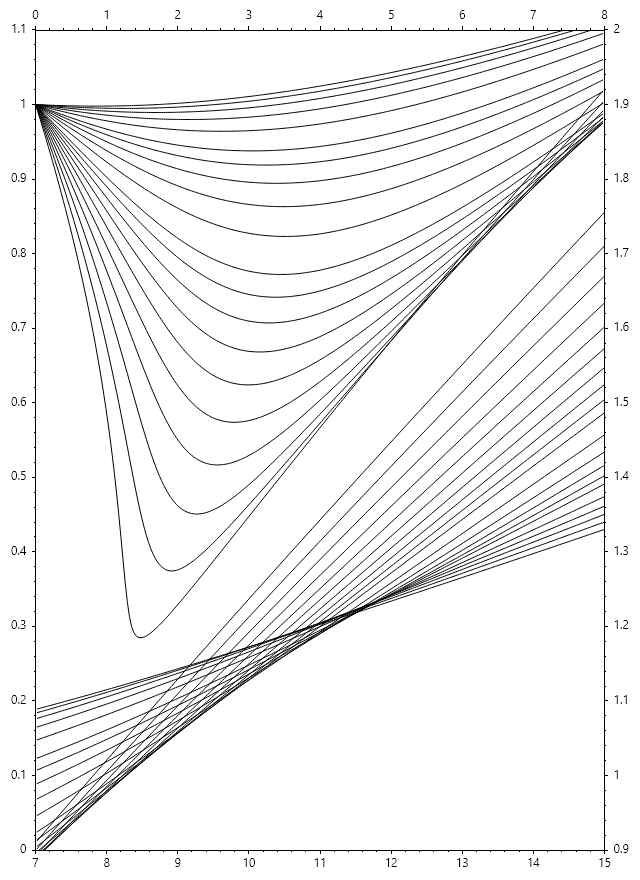
Figure(640, 880);
var z1 = Plot(Pr[Pr <= 8], ZHY[Pr <= 8, ..], "k"); HoldOn();
var z2 = Plot(Pr[Pr >= 7], ZHY[Pr >= 7, ..], "k"); HoldOff();
SetAxis(z1, X_Axis.Top, Y_Axis.Left, 0, 8, 0, 1.1);
SetAxis(z2, X_Axis.Bottom, Y_Axis.Right, 7, 15, 0.9, 2.0);
SaveAs("Hall_Yarborough_Chart.png");
CloseFig();
static double ZfactorDAK(double Ppr, double Tpr)
{
    double z = 1;
    if (Ppr != 0)
    {
        double Tpr2 = Tpr * Tpr, Tpr3 = Tpr2 * Tpr,
            Tpr4 = Tpr3 * Tpr, Tpr5 = Tpr4 * Tpr,
        A1 = 0.3265, A2 = -1.0700, A3 = -0.5339,
        A4 = 0.01569, A5 = -0.05165, A6 = 0.5475,
        A7 = -0.7361, A8 = 0.1844, A9 = 0.1056,
        A10 = 0.6134, A11 = 0.7210,
        R1 = A1 + A2 / Tpr + A3 / Tpr3 + A4 / Tpr4 + A5 / Tpr5,
        R2 = 0.27 * Ppr / Tpr,
        R3 = A6 + A7 / Tpr + A8 / Tpr2,
        R4 = A9 * (A7 / Tpr + A8 / Tpr2),
        R5 = A10 / Tpr3;
        double yfunc(double y)
        {
            double y2 = y * y, y5 = y2 * y2 * y;
            double E = (1 + A11 * y2) * Exp(-A11 * y2);
            return R5 * y2 * E + R1 * y - R2 / y + R3 * y2 - R4 * y5 + 1;
        }
        ;
        var options = SolverSet(StepFactor: 0.5);
        double y = Fsolve(yfunc, R2, options);
        z = R2 / y;
    }
    return z;
}

// set up ressure and temperature mesh
ColVec Pr = Linspace(0, 15, 501);
double[] Tr = [1.05,    1.10,   1.15,   1.20,   1.25,   1.30,   1.35,
               1.40,    1.45,   1.50,   1.60,   1.70,   1.80,   1.90,
               2.00,    2.20,   2.40,   2.60,   2.80,   3.00];

// compute z factors and plot them
List<string> Tlabels = [.. Tr.Select(tr => "Tr = " + tr)];
Matrix ZDAK = Meshfun(ZfactorDAK, Pr, Tr);

// Plot result.
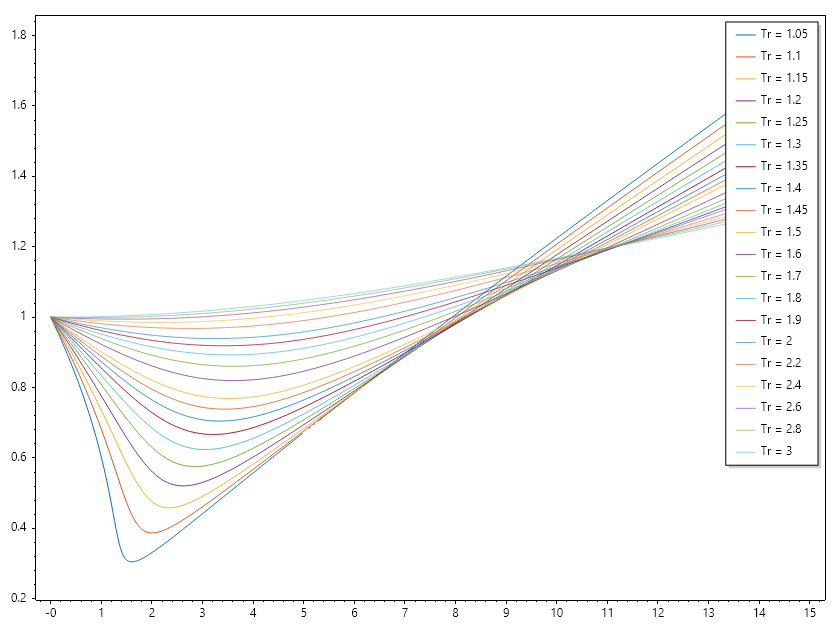
Plot(Pr, ZDAK);
Legend(Tr.Select(tr => "Tr = " + tr), UpperRight);
SaveAs("Zfactor_Dranchuk_Abou_Kassem.png");

// Literature style plot
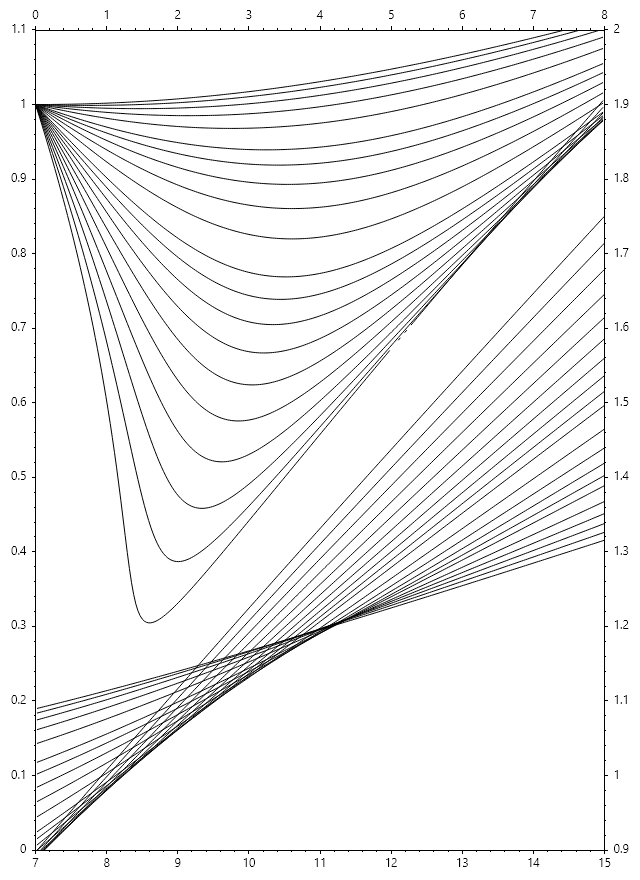
Figure(640, 880);
var z1 = Plot(Pr[Pr <= 8], ZDAK[Pr <= 8, ..], "k"); HoldOn();
var z2 = Plot(Pr[Pr >= 7], ZDAK[Pr >= 7, ..], "k"); HoldOff();
SetAxis(z1, X_Axis.Top, Y_Axis.Left, 0, 8, 0, 1.1);
SetAxis(z2, X_Axis.Bottom, Y_Axis.Right, 7, 15, 0.9, 2.0);
SaveAs("Dranchuk_Abou_Kassem_Chart.png");
CloseFig();
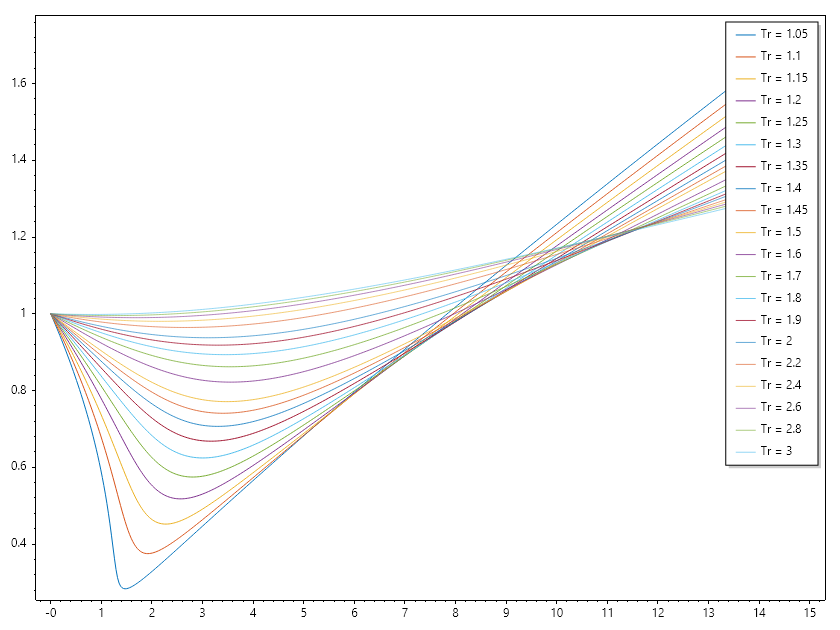
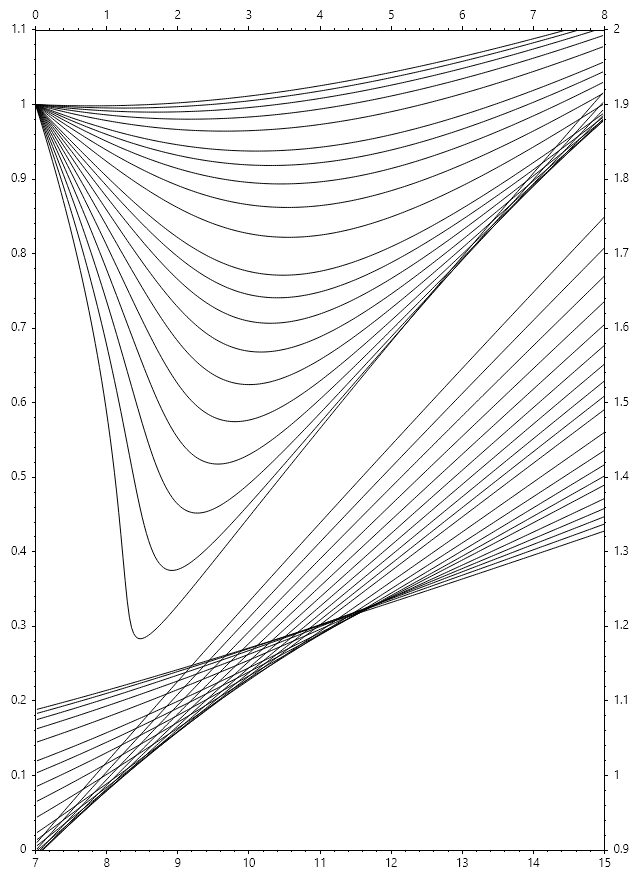
static double ZfactorDPR(double Pr, double Tr)
{
    double z = 1;
    if (Pr != 0)
    {
        double Tr2 = Tr * Tr, Tr3 = Tr2 * Tr, E,
            A1 = 0.31506237, A2 = -1.04670990, A3 = -0.57832720, A4 = 0.53530771,
            A5 = -0.61232032, A6 = -0.10488813, A7 = 0.68157001, A8 = 0.68446549,
            T1 = A1 + A2 / Tr + A3 / Tr3, T2 = A4 + A5 / Tr, T3 = A5 * A6 / Tr,
            T4 = A7 / Tr3, T5 = 0.27 * Pr / Tr, y2, y5, v = T5;
        var yfunc = new Func<double, double>(y =>
        {
            y2 = y * y; y5 = y2 * y2 * y; E = (1 + A8 * y2) * Exp(-A8 * y2);
            return 1 + T1 * y + T2 * y2 + T3 * y5 + T4 * y2 * E - T5 / y;
        });
        var options = SolverSet(StepFactor: 0.5);
        double y = Fsolve(yfunc, v, options);
        z = 0.27 * Pr / (Tr * y);
    }
    return z;
}

// set up ressure and temperature mesh
ColVec Pr = Linspace(0, 15, 501);
double[] Tr = [1.05,    1.10,   1.15,   1.20,   1.25,   1.30,   1.35,
               1.40,    1.45,   1.50,   1.60,   1.70,   1.80,   1.90,
               2.00,    2.20,   2.40,   2.60,   2.80,   3.00];

// compute z factors and plot them
List<string> Tlabels = [.. Tr.Select(tr => "Tr = " + tr)];
Matrix ZDPR = Meshfun(ZfactorDPR, Pr, Tr);

// Plot result.
Plot(Pr, ZDPR);
Legend(Tr.Select(tr => "Tr = " + tr), UpperRight);
SaveAs("Zfactor_Dranchuk_Purvis_Robinson.png");

// Literature style plot
Figure(640, 880);
var z1 = Plot(Pr[Pr <= 8], ZDPR[Pr <= 8, ..], "k"); HoldOn();
var z2 = Plot(Pr[Pr >= 7], ZDPR[Pr >= 7, ..], "k"); HoldOff();
SetAxis(z1, X_Axis.Top, Y_Axis.Left, 0, 8, 0, 1.1);
SetAxis(z2, X_Axis.Bottom, Y_Axis.Right, 7, 15, 0.9, 2.0);
SaveAs("Dranchuk_Purvis_Robinson_Chart.png");
CloseFig();