NonLinear System
The SepalSolver function Fsolve is used to solve systems of nonlinear equations.
It finds a vector \(\mathbf{x}\) such that:
Unlike Fzero, which works for single-variable equations, Fsolve is designed for multivariable problems.
Syntax
The basic syntax is:
x = Fsolve(fun, x0);
Where:
fun: Function handle that returns a vector of equations.x0: Initial guess for the solution vector.
Just like the case of Fzero, we can use SolverSet to configure the solver and gain a window into what is going on under the hood.
var options = SolverSet(Display: true);
x = fsolve(fun, x0, options);
How fsolve Works
fsolveuses iterative numerical methods such as:Newton Raphson Algorithm (default, robust for many problems).
Forward Differencing for Numerical differentiation of the function
**LU rank 1 update to directly update the LU factors reducing the neet for repeated factorization.
It requires a good initial guess because nonlinear systems may have multiple solutions or none at all.
Examples
Example 1 : : Single Equation
Solve: \(x^2 - 4 = 0\):
double fun(double x) => x*Sin(x) - 0.5;
double x0 = 1;
double root = Fsolve(fun, x0);
Console.WriteLine($"root = {root}");
Ouput
root = 0.7408409563908155
Example 2 : System of Equations
Solve the system:
Where: \(x_0 = [0.1, 0.1, -0.1]^T\)
double[] fun(double[] x) => [3 * x[0] - Cos(x[1] * x[2]) - 0.5,
                             x[0] * x[0] - 81*Pow(x[1] + 0.1, 2) + Sin(x[2]) + 1.06,
                             Exp(-x[0] * x[1]) + 20 * x[2] + (10 * pi - 3) / 3];
// set initial guess
double[] x0 = [0.1, 0.1, -0.1];

// call the solver
var x = Fsolve(fun, x0);

// display the result
Console.WriteLine(x);
Ouput
 0.5000
 0.0000
-0.5236
Just like the case of single variable nonlinear equation, nonlinear system can also be solved using automatic differentiation class
AutoDiff[] fun(AutoDiff[] x) => [3 * x[0] - Cos(x[1] * x[2]) - 0.5,
                     x[0] * x[0] - 81*Pow(x[1] + 0.1, 2) + Sin(x[2]) + 1.06,
                     Exp(-x[0] * x[1]) + 20 * x[2] + (10 * pi - 3) / 3];
// set initial guess
double[] x0 = [0.1, 0.1, -0.1];

// call the solver
var opts = SolverSet(Display: true);
var x = Fsolve(fun, x0, opts);

// display the result
Console.WriteLine(x);
Ouput
Iteration    Func-count       f(x)      Norm of Step
    0            1             0           Start
    1            2          0.34586       0.58656
    2            3          0.02588       0.01799
    3            4        2.012e-004      0.00157
    4            5        1.254e-008     1.245e-005
    5            6        1.776e-015     7.761e-010

  0.5000
  0.0000
 -0.5236
Applications
Engineering: Nonlinear circuit analysis, chemical equilibrium.
Physics: Solving coupled nonlinear equations in dynamics.
Optimization: Finding stationary points of nonlinear functions.
Limitations
Requires a good initial guess; poor guesses may lead to divergence.
May converge to local solutions rather than global ones.
Sensitive to scaling of equations.
Comparison with fzero
Feature |
|
|
|---|---|---|
Problem type |
Single nonlinear equation |
System of nonlinear equations |
Input |
Function handle, scalar or interval |
Function handle, vector initial guess |
Methods used |
Bisection, secant, inverse quadratic interp |
Newton-Raphson’s method |
Output |
Scalar root |
Vector solution |
Parameterized Equations
Parameterized nonlinear equations \(F(x, \lambda) = 0\) are equations or systems of equations that depend on one or more parameters: \(\lambda\). They are widely used in mathematics, engineering, and economics to study how solutions change as parameters vary, enabling sensitivity analysis, bifurcation studies, and optimization.
This parameter(s) can be exploited to provide means to guarantee that a good initial guess can be estimated. For instance, some values of the parameter might help eliminate the nonlinearity of the system and hence, no guess is needed for the solution. Then variation of this parameter can then be used to move the solution \(x\) gently to their values that corresponds to the orginally intended values of the parameter \(\lambda\).
Example 2 :
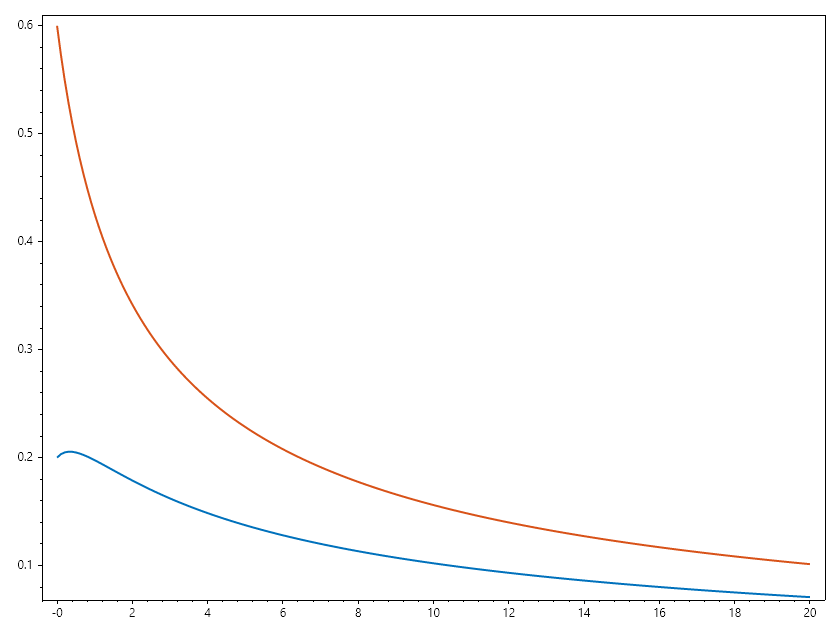
Consider this parameterized nonlinear system. The nonlinearity is controlled by parameter \(c\).
Setting \(c = 0\), turns this system into a linear system with solution of \([x,y] = [0.2, 0.6]\) Hence, we can gradually change \(c\) from \(0\) to \(20\), while solving for \([x, y]\).
// Parameterized nonlinear equations
double[] paramfun(ColVec x, double c)
{
    return [ 2*x[0] + x[1]  - Exp(-c*x[0]),
    -x[0] + 2*x[1]  - Exp(-c*x[1])];
}

// variatiob of c from 0 to 20.
RowVec C = Linspace(0, 20, 200);

// initial guess as solution of linear system when c = 0.
ColVec x = new double[] { 0.2, 0.6 };

// setting maximum iteration number
var opts = SolverSet(MaxIter: 1000);
Matrix X = C.Select(c => x = Fsolve(x => paramfun(x, c), x, opts)).ToList();
Plot(C, X, Linewidth: 2);
SaveAs("Parameterozed_Nonlinear_Equations.png");
Matrix Equation
The SepalSolver also allow for easy computation of matrix equations. For instance, we can easily compute the cuberoot of a matrix. \(x^3 = \begin{pmatrix} 1&2 \\ 3&4 \end{pmatrix}\);
Example 3 :
// Solve Nonlinear System of Polynomials
Matrix A = new double[,]
{
    {1, 2},
    {3, 4}
};
var opts = SolverSet(Display: true);
Matrix x = Fsolve(x => x*x*x - A, Ones(2, 2), opts);
Console.WriteLine(x);
Ouput
Iteration    Func-count       f(x)      Norm of Step
    0            1          3.74165        start
    1            6          0.94293       0.61237
    2            7          2661960       6432.80
    3            8          0.45614       6432.80
    4            9          0.39097       0.05487
    5            10         0.39548       0.03847
    6            11         0.39690       0.00219
    7            12         0.39702      1.712e-004
    8            17         263.674       6.34236
    9            18         0.37461       6.33363
    10           19         0.37411       0.00901
    11           20         3.91142       1.47633
    12           21         0.35406       1.34995
    13           22         0.31481       0.11135
    14           23         1.75353       0.89775
    15           24         0.22618       0.76114
    16           29         0.13103       0.26771
    17           30         0.03317       0.09820
    18           31         0.00338       0.01983
    19           32       1.047e-004      0.00225
    20           33       3.140e-007     6.762e-005
    21           34       2.926e-011     2.022e-007

 -0.1291    0.8602
  1.2903    1.1612
Summary
Fsolve is SelapSolver’s go-to tool for solving nonlinear systems. It is powerful and flexible, but demands careful choice of initial guesses and problem formulation to ensure convergence.