Polynomial Fitting
Polynomial Fitting (Polyfit)
In engineering and data science, we often encounter discrete data points that represent a physical process. Polynomial Fitting is the mathematical technique used to find a continuous function—specifically a polynomial—that minimizes the discrepancy between the curve and the observed data. In SepalSolver, we use the Least Squares approach to determine these coefficients.
1. Mathematical Objective
The goal of Polyfit is to find a set of coefficients for a polynomial of degree \(N\):, \(P(x) = a_0 x^N + a_1 x^{N-1} + \dots + a_N\) such that the sum of the squares of the residuals (the vertical distance between the data points and the curve) is minimized.
2. Coefficient Order
Note that while the internal math often builds from the constant term up, SepalSolver returns the resulting double[] array in descending order. This means the first element in the array is the coefficient for the highest power \(x^N\).
Examples
Example 1 : Fitting a Perfect Quadratic
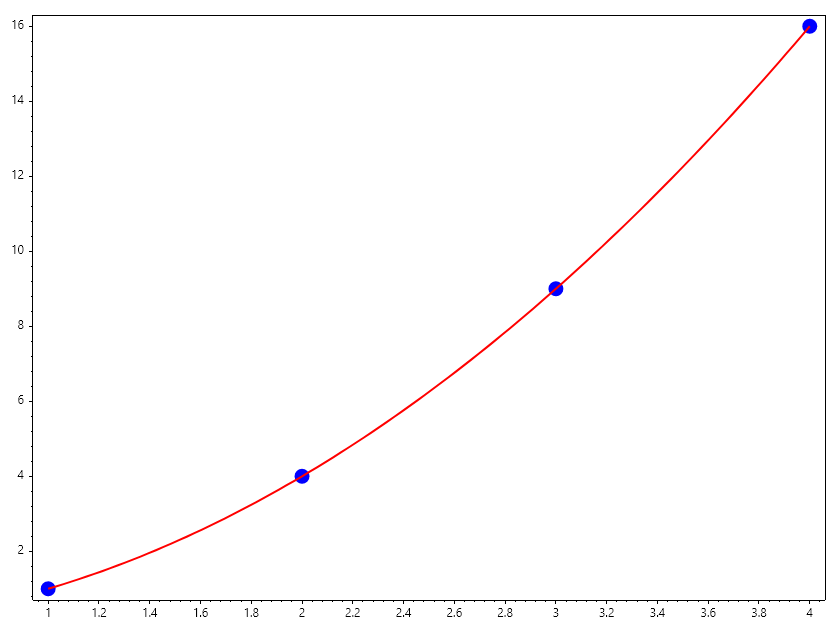
If our data follows a perfect square relationship, such as \(y = x^2\), we expect Polyfit to return coefficients that reflect \(1x^2 + 0x + 0\). In this example, we fit a degree \(N=2\) polynomial to a set of coordinates.
// Define data points
double[] X = [1, 2, 3, 4];
double[] Y = [1, 4, 9, 16];
int N = 2;

// Perform the fit
double[] coefficients = Polyfit(X, Y, N);

// Output: 1, 0, 0 (representing 1x^2 + 0x + 0)
Console.WriteLine($"Coefficients: [{string.Join(", ", coefficients.Select(n => n.ToString("F4")))}]");

// Plotting the results
Scatter(X, Y, "fob", 15); HoldOn();
double[] x = Linspace(1, 4);
double[] y = [..x.Select(x => Polyval(coefficients, x))];
Plot(x, y, "r", Linewidth: 2); HoldOff();
SaveAs("Polyfit_Example1.png");
Ouput
Coefficients: [1.0000, 0.0000, 0.0000]
Example 2 : Linear Regression from Sensor Data
Imagine you are testing a linear spring. You record the force \(Y\) applied at various displacements \(X\). By fitting a degree \(N=1\) polynomial, you can find the spring constant \(k\), which corresponds to the first coefficient in the returned array.
double[] X = [0.1, 0.2, 0.3, 0.4];     // Displacement
double[] Y = [10.2, 20.1, 29.9, 40.2]; // Force

// Fit a line: P(x) = a0*x + a1
double[] p = Polyfit(X, Y, 1);

Console.WriteLine($"Spring Constant k: {p[0]} N/m");
Ouput
Spring Constant k: 99.79999999999995 N/m
Example 3 : Handling Noise in Experimental Data
Real-world data is rarely perfect. When data points are “noisy,” fitting a lower-degree polynomial acts as a filter, capturing the general trend without being distracted by individual measurement errors.
double[] X = [1, 2, 3, 4, 5];
double[] Y = [2.1, 3.9, 6.2, 8.1, 9.8]; // Roughly y = 2x

// Even if we fit a degree 2, the leading coefficient should be near zero
double[] p = Polyfit(X, Y, 2);

Console.WriteLine($"Quadratic term (should be small): {p[0]}");
Ouput
Quadratic term (should be small): -0.04285714285714366
Usage Warning
Ensure that the length of arrays \(X\) and \(Y\) are identical. Additionally, to find a unique solution for a degree \(N\) polynomial, you must provide at least \(N+1\) data points. Providing fewer points will result in an underdetermined system and numerical instability. It is also important to choose the correct degree of the polynomial to get a good fit. Overfitting can occur if the degree is too high, while underfitting can happen if the degree is too low.
Example 4 : Underfitting Problem
In this example, we compare a linear and quaradtic fit for the same data. showing the importance of choosing the right degree for the fitting.
// Example of polynomial fitting
double[] x = [1, 2, 3, 4, 5], y = [6, 9, 14, 21, 30];
Scatter(x, y, "fob"); HoldOn();

double[] xp = Linspace(1, 5);
double[] fit1 = Polyfit(x, y, 1);
double[] yp1 = [.. xp.Select(x => Polyval(fit1, x))];
Plot(xp, yp1, "r");
Console.WriteLine($"""
    Linear fit : [{string.Join(",", fit1)}]
    Residual: {yp1.Zip(y, (l, m) => Pow(l-m, 2)).Sum()}
    """);

double[] fit2 = Polyfit(x, y, 2);
double[] yp2 = [.. xp.Select(x => Polyval(fit2, x))];
Plot(xp, yp2, "g");
Console.WriteLine($"""
    Quaratic fit : [{string.Join(",", fit2)}]
    Residual: {yp2.Zip(y, (q, m) => Pow(q-m, 2)).Sum()}
    """);

Legend(["Data", "Linear Fit", "Quadratic Fit"]);
HoldOff();
SaveAs("Polyfit_Example_4.png");
Ouput
Linear fit : [5.999999999999998,-1.9999999999999942]
Residual: 1008.4903581267214
Quaratic fit : [1.0000000000000193,-1.2151770273257475E-13,5.000000000000152]
Residual: 846.5558445323921

Multivariate Polynomial Fitting
In many engineering scenarios, a dependent variable :math:z is influenced by multiple independent variables (e.g., \(x\) and \(y\)). This is known as Multivariate Fitting or Surface Fitting. While a standard Polyfit handles a single line, a multivariate fit finds a surface that minimizes the residuals across multiple dimensions.
1.The Mathematical Model
For two variables \(x\) and \(y\), a second-order multivariate polynomial takes the form: \(z(x, y) = a_0 + a_1x + a_2y + a_3x^2 + a_4xy + a_5y^2\) The “cross term” :math: xy is vital because it accounts for the interaction between the two variables—how the influence of :math:x might change depending on the current value of \(y\).
2.Implementation Logic
In SepalSolver, multivariate fitting is performed by constructing an augmented matrix where each column represents a term in the polynomial expansion(1, \(x\), \(y\), \(x^2\), etc.) and solving the resulting linear system.
// Data points: (x, y) coordinates and observed z values
double[] x = [0, 1, 2, 0, 1, 2], y = [0, 0, 0, 1, 1, 1], z = [1.1, 2.0, 3.9, 2.2, 3.1, 5.1];

// Fitting for a plane: z = a + bx + cy
// We construct a matrix A where rows are [1, x_i, y_i]
List<ColVec> A = [Ones(x.Length), x, y];

// Solve for coefficients using the Normal Equation (Least Squares)
// A' * A * coeff = A' * z
var coeff = Mldivide(A, z);

Console.WriteLine($"Model: z = {coeff[0]} + {coeff[1]}x + {coeff[2]}y");
Ouput
Model: z = 0.908333333333332 + 1.4250000000000007x + 1.133333333333334y
Examples
Example 3 :
The Antoine equation relates the vapor pressure of a substance to its temperature:
Where: - \(p\) = vapor pressure - \(T\) = temperature - \(A, B, C\) = substance-specific constants
In other to estimate the values of this constants, we express the equation in a linear form
Step 1: Multiplying Both Sides by \((C + T)\)
Step 2: Expanding Both Sides
Step 3: Rearranging the terms:
This is a linear equation in terms of \(T\) and \(log10(p)\), which can be used to estimate the constants \(A\), \(B\), and \(C\) via multiple linear regression.
Slope with respect to \(T \to A\)
Slope with respect to \(log10(p) \to -C\)
Intercept \(\to AC - B\)
\(A\), \(B\), and \(C\) can then be solved systematically from regression results.
To estimate the parameters \(A\), \(B\), and \(C\)
Hence: - \(A = \alpha\) - \(C = -\beta\) - \(B = AC-\gamma\)
// Curve Fitting for Antoine Equation [lnP = A - B/(T + C)]
double[] P_Kpa = [3.18, 5.48, 9.45, 16.9, 28.2, 41.9, 66.6, 89.5, 129, 187],
         T_C = [-18.5, -9.5, 0.2, 11.8, 23.1, 32.7, 44.4, 52.1, 63.3, 75.5];

// Convert Temperature to Kelvin, Compute the natural logarithm of Pressure
ColVec T = (ColVec)T_C + 273.15, LogP = Log10((ColVec)P_Kpa);
ColVec TLogP = T.Times(LogP), One = Ones(T_C.Length);

// Multilinear fit
List<ColVec> M = [T, LogP, One];
var x = Mldivide(M, TLogP);

// Extract fitted parameters
double A = x[0], C = -x[1], B = A*C-x[2];
Console.WriteLine($"Fitted Parameters: A = {A:F4}, B = {B:F4}, C = {C:F4}");
Ouput
Fitted Parameters: A = 6.1681, B = 1170.7321, C = -48.0075
Exercise: Term Expansion
Task: To fit a full quadratic surface \(z = a + bx + cy + dxy\), your matrix A needs four columns. Complete the column assignment for the cross-term \(xy\).
// Data points
double[] x = [0, 1, 2, 0, 1, 2], y = [0, 0, 0, 1, 1, 1], z = [1.1, 2.0, 3.9, 2.2, 3.1, 5.1];

// Compute the cross term for multivariate polynomial fitting
double[] xy = [..x.Zip(y, (xi, yi) => xi * yi)];

// Task: Make the Matrix A with the cross term included

// Solve for the coefficients using Least Squares